
Caregiver Handoff Checklist for a Shared Baby Log
Use this caregiver handoff checklist to review a shared baby log, confirm missing details and agree who records the next update in Milk & Minutes.

A caregiver handoff checklist gives the next person a place to start: what was recorded, what is unclear, and who will add the next update. Milk & Minutes brings nursing, bottle and pumping entries into a shared family history on iPhone and Android. The log supports your conversation; it does not replace it.
This walkthrough is about using that record together. It does not set feeding amounts, feeding intervals or a care plan. Those decisions stay with your family and care team.
What belongs in a caregiver handoff checklist?
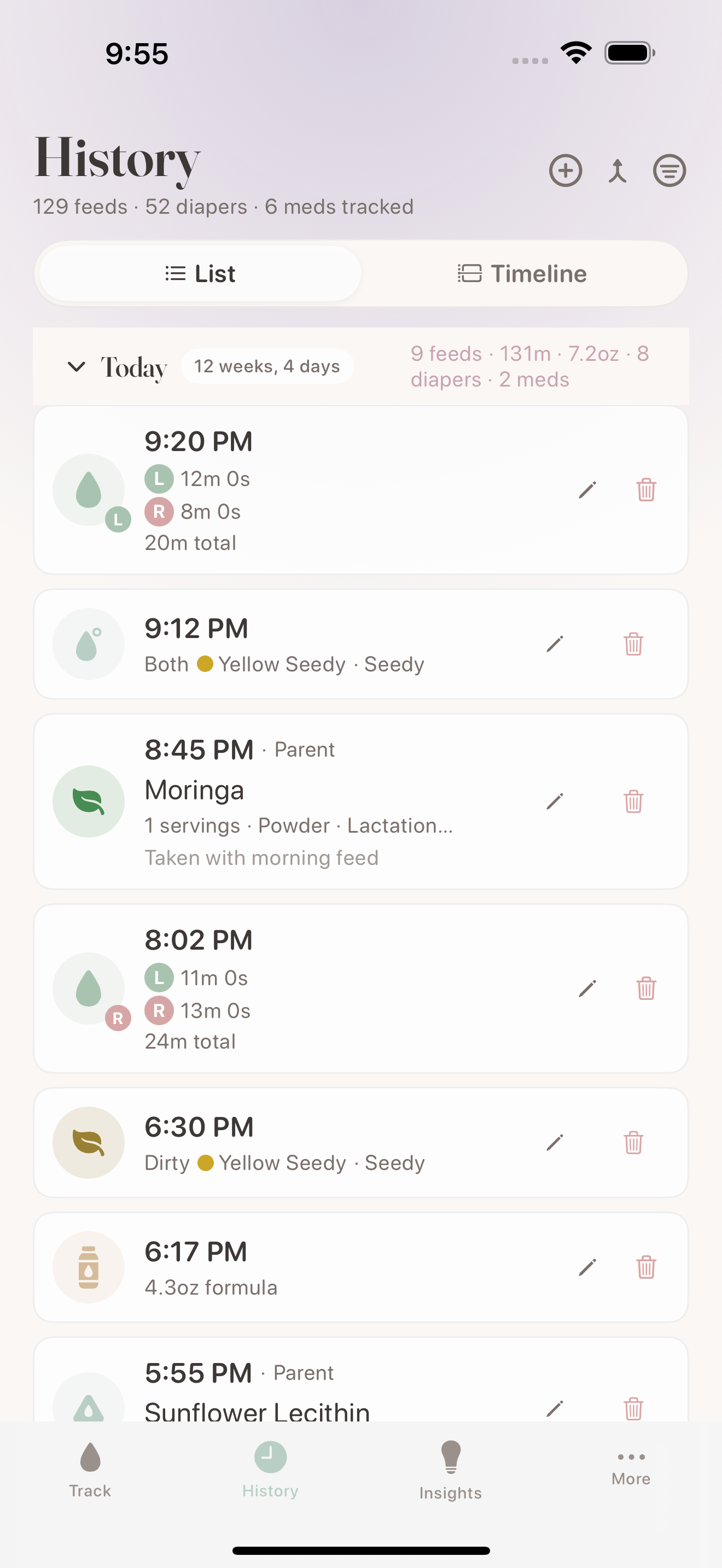
Open the same family history, review the latest recorded entry, confirm anything unclear with the caregiver who added it, and agree who will record the next update. If a device was offline or an entry is missing, say so during the handoff instead of treating the displayed history as a complete account.
- Check the shared record together.
- Separate recorded information from details that still need confirmation.
- Agree who will add the next entry.
1. Start with the same family record
Before the handoff, confirm that both caregivers have access to the intended family history. Milk & Minutes supports invited caregivers across iOS and Android. Each caregiver uses their own access to the shared family record, as described in the caregiver handoff overview.
The useful check is concrete: can each person see the entry you are discussing? Seeing an app open on both phones is different from confirming the same recorded update. If the histories do not match, keep the handoff conversation going while you clarify what each person can see.
2. Review what was actually recorded
Open the recent history and find the entry you want to hand over. Name what it contains rather than filling in details from memory. A bottle entry, a nursing session and a pumping session describe different recorded activities.
Keep any unrecorded detail separate. For example, “The bottle entry is in the log; I still need to confirm the time” gives the next caregiver more useful context than “Everything is up to date.” An absent entry does not establish that an activity did not happen. A visible entry does not establish that every detail was entered correctly.
3. Confirm gaps before relying on the screen
A shared log reflects what people enter and synchronize. The current sharing guidance explains that it cannot guarantee every feed was recorded or prevent a duplicate feed. Connectivity and missing entries matter during a handoff.
If a device was offline, or the latest entry is unclear, ask the other caregiver what they recorded. Avoid turning a blank space into an assumption. The aim is a shared understanding of the record, with uncertainty stated plainly.
4. Agree who will add the next update
Finish the handoff by naming who will record the next activity. This is a conversation between caregivers, not a claim that the app assigns responsibilities or checks whether care happened.
After adding an entry, look for it in the family history. That gives you a visible check of what the app is displaying. It is not a guarantee that another device has received it, especially when connectivity is interrupted. If the other caregiver needs the information now, confirm it with them directly.
A fictional handoff example
Alex is taking over from Sam. They open the shared history and find the latest bottle entry. Sam points out that a pumping entry has not yet been added because the phone was offline. They keep that detail in the conversation instead of asking Alex to infer it from the screen.
Alex agrees to add the next update. Sam confirms the missing entry when it is available. This example illustrates a recordkeeping conversation; it is not a feeding schedule, a real family's history or a promise that the app detects missing information.
What is free, and what does Pro add?
Core tracking and family sync are free in Milk & Minutes. Pro adds stash tools, longer history and exports. The handoff workflow above uses the shared record rather than requiring an exported report. See the current Free and Pro comparison for plan details.
If you are working on how to share overnight responsibilities, our guide to splitting night feeds covers that separate topic. This checklist stays focused on reviewing the log when care changes hands.
Questions about a shared baby log
Can caregivers use different phones?
Milk & Minutes supports shared family access across iOS and Android. Features and layouts can differ by platform and version; this walkthrough does not depend on an identical screen layout.
Does a shared log replace a verbal handoff?
It provides recorded context for the handoff. Confirm unclear or missing information with the other caregiver, including updates that may not have synchronized.
Do we need Pro to share core tracking?
Core tracking and family sync are included in Free. Pro adds stash tools, longer history and exports; the current plan comparison lists the details.
Try it with your next recorded update
Start with one entry, review it together, and agree who will add the next one. Explore the shared caregiver workflow, or get Milk & Minutes for iPhone or Android.
References
- Milk & Minutes: caregiver handoffs. Shared records, supported platforms, connectivity limits and the role of caregiver confirmation. Checked November 2, 2026.
- Milk & Minutes: Free and Pro. Current plan comparison. Checked November 2, 2026.
Related articles
 Product Updates
How Milk & Minutes Schedule View Shows Your Baby's Full Feeding Day at a Glance
The Schedule View in Milk & Minutes turns a day of logged feeds into a visual timeline — showing cluster feeding, quiet periods, and patterns at a glance.
 Product Updates
What Your Milk & Minutes Nursing Dashboard Is Actually Telling You
Your nursing data tells a story. Learn how to read LATCH trends, side balance, comfort scores, and session patterns in Milk & Minutes to understand how breastfeeding is progressing over time.
 Product Updates
Hey Siri, Log a Feed: How to Track Feedings Hands-Free at 3am
Discover how Milk & Minutes lets you log feeds, check timers, and track your baby hands-free with Siri, Live Activities, and home screen widgets — no unlocking required.