
Best Newborn Tracker App for the First Three Months
The first three months with a newborn are intense. A good newborn tracker app cuts through the chaos — here is what to look for and what actually matters.

Week one with a newborn looks something like this: feed, burp, diaper, attempt sleep, wonder if that was enough, repeat. You lose track of when you last fed, which side you started on, whether the baby has had enough wet diapers today. Everything blurs together. A newborn tracker app exists specifically to hold that information so you do not have to.
But not all newborn trackers are built the same. Here is what actually matters in the first three months — and what to look past.
How often do newborns need to be fed?
According to the American Academy of Pediatrics, newborns typically feed 8 to 12 times in every 24 hours in the early weeks — roughly every 2 to 3 hours. The AAP recommends feeding on demand rather than on a strict schedule, which means tracking when feeds happen becomes one way to keep a record for conversations with your baby’s care team.
What the First Three Months Actually Demand from a Tracker
The newborn stage is different from what comes after. In months zero through three, feeding patterns are being established, your body (if you are nursing or pumping) is building supply, and your baby's needs are shifting week by week. A tracker built for this stage needs to do a few specific things well.
Log fast — you will be doing it constantly
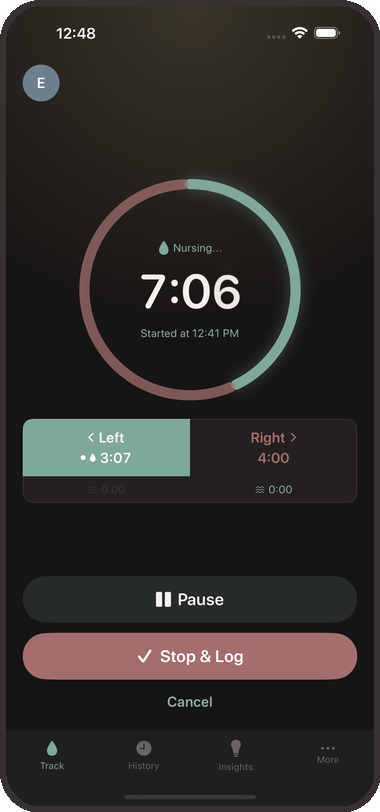
With 8 to 12 feeds per day, you are logging many times every 24 hours. The app needs to start tracking in one tap and stay out of your way. This is not the stage for elaborate onboarding flows or multi-step entry screens. Tap, track, put the phone down.
Work in the dark, one-handed
Night feeds are when tracking discipline falls apart for most parents. If the app requires two hands, a lit screen, and three taps to start a timer, it will not get used at 2am. The best newborn trackers work from the lock screen — no app opening required. Milk & Minutes shows a live session timer on the lock screen and in the iOS Dynamic Island the moment a feed starts, so glancing at elapsed time is a single look, not a task.
Tell you what happened while you were not looking
Milk & Minutes shares family records across connected devices. Updates depend on connectivity and each device. Check the latest entry together and confirm unclear information with the other caregiver; synchronization cannot guarantee that every feed was recorded.
Show you the pattern, not just the last entry
Individual feeds tell you what happened. The pattern tells you what is going on. Is the baby feeding more frequently today? Is there a cluster feeding window forming in the evening? Are overnight stretches getting slightly longer? These are the questions that matter in the first three months, and they require looking at more than just the most recent entry. The Schedule View in Milk & Minutes shows an entire day of feeds as a visual timeline, with predicted next feed times and cluster feeding detection.
Features That Sound Useful But Are Not (Yet)
A lot of newborn tracker apps are loaded with features you will not touch until month four or five at the earliest. Growth percentile charts, solid food logs, developmental milestone checklists — these are genuinely useful eventually, but they add visual weight and complexity in an interface you are trying to use in a dark room at 3am.
In the first three months, the highest-value features are the ones that reduce friction: quick log, lock screen access, partner sync, and a clear view of feeding history. Everything else is a bonus.
The Pediatrician Angle
Your baby will have several well-child visits in the first three months. At each one, your pediatrician will ask about feeding frequency, wet diaper count, and weight gain. Having a running feed history — how many times per day, average duration, any notable pattern changes — is genuinely useful in these conversations.
If your baby has any feeding concerns (slow weight gain, unusually long gaps between feeds, significant changes in feeding behavior), a detailed log becomes more than convenient — it gives your care team a real picture of what has been happening. The AAP recommends regular well-child visits at 2 weeks, 2 months, and 4 months in the first months of life. A tracker that is easy to maintain means you arrive at those appointments with actual data.
What Changes After Month Three
Around the 3-month mark, a few things tend to shift. Feeding intervals often lengthen. Many babies start to show more predictable patterns. If you have been nursing, supply is typically more established. And you will probably start to feel like a slightly more functional human being.
This is when the deeper analytics features become more useful — volume trends if you are pumping, side balance analysis for nursing, pattern predictions. The same tracker that was your sanity-saving log in month one becomes a genuine insights tool in month three and beyond.
The baby hunger cues your newborn shows also become more readable over time — you can learn more about recognizing early feeding cues to get ahead of the hunger-cry cycle.
The first three months are the hardest. You are doing something remarkable, feed by feed, nap by nap. A tracker does not make it easy — nothing does that — but it takes one thing off your mental list. That is enough.
Ready to track your first feed? Download Milk & Minutes free on the App Store or Google Play — set up takes under two minutes.
Sources
Related articles
 Baby Tracking
How to Introduce Allergens to Your Baby: A Step-by-Step Guide
Introducing allergens to your baby early may reduce allergy risk by up to 81%, research shows. Here's when to start, how to do it safely, and what to look for.
 Baby Tracking
How to Relieve Baby Gas: Positions and Techniques That Actually Work
Gassy baby at 3am? Learn the evidence-based positions and feeding adjustments pediatricians recommend — and what actually moves trapped gas.
 Baby Tracking
Why Is My Baby Spitting Up So Much? What’s Expected, What’s Reflux, and What Helps
Most babies spit up daily in the first months — but when does it cross into reflux or GERD? Learn what’s expected, warning signs, and what the AAP says actually helps.